Integrate your system with official WhatsApp in minutes

Connect your number to Meta's official API to send and receive messages with simple REST endpoints and webhooks.

See the product in action

Dashboard, activities, limits, routes, and templates in one visual operation.

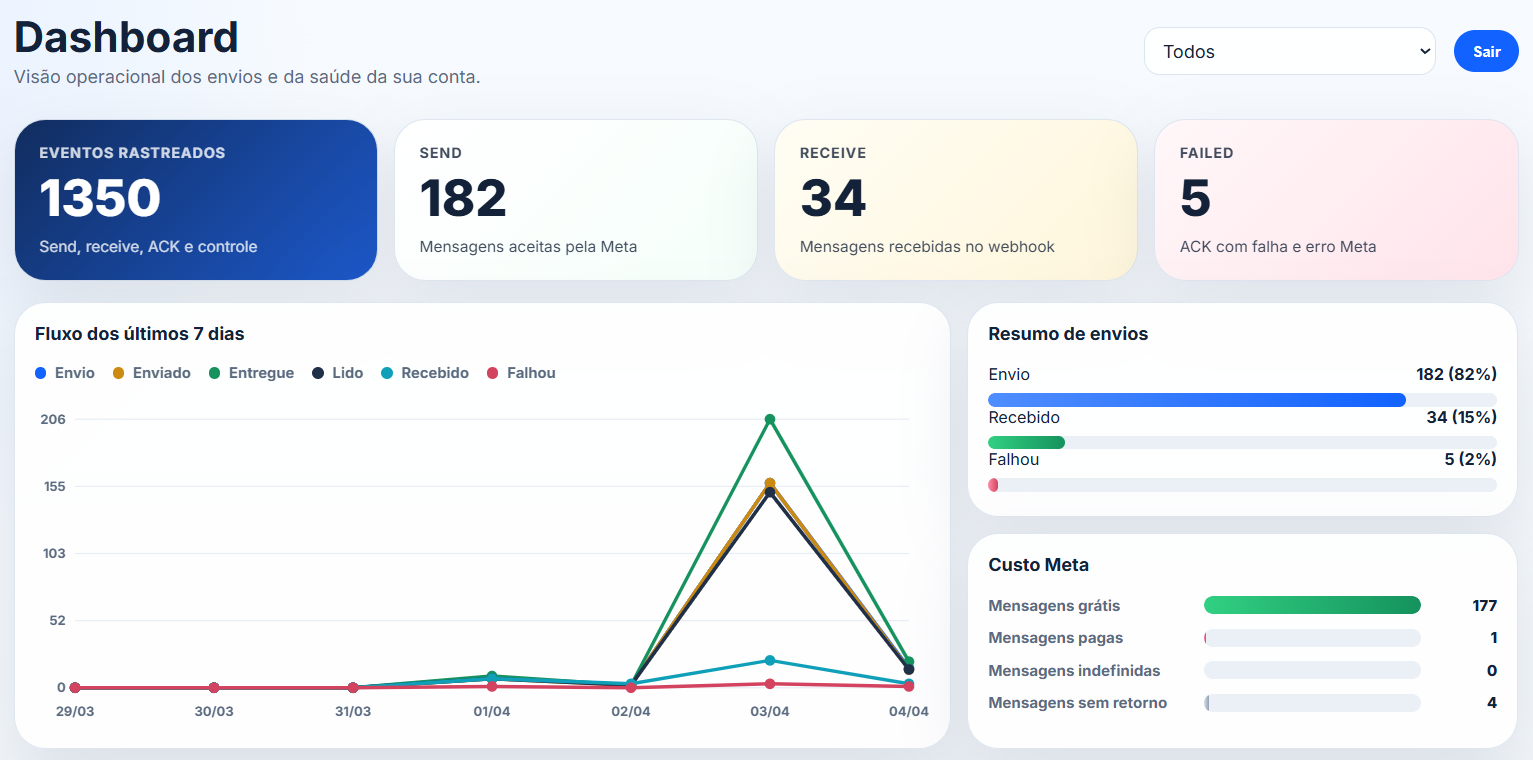
Operational dashboard

Operational dashboard

Track volume, statuses, Meta costs, and account health from a single control panel.
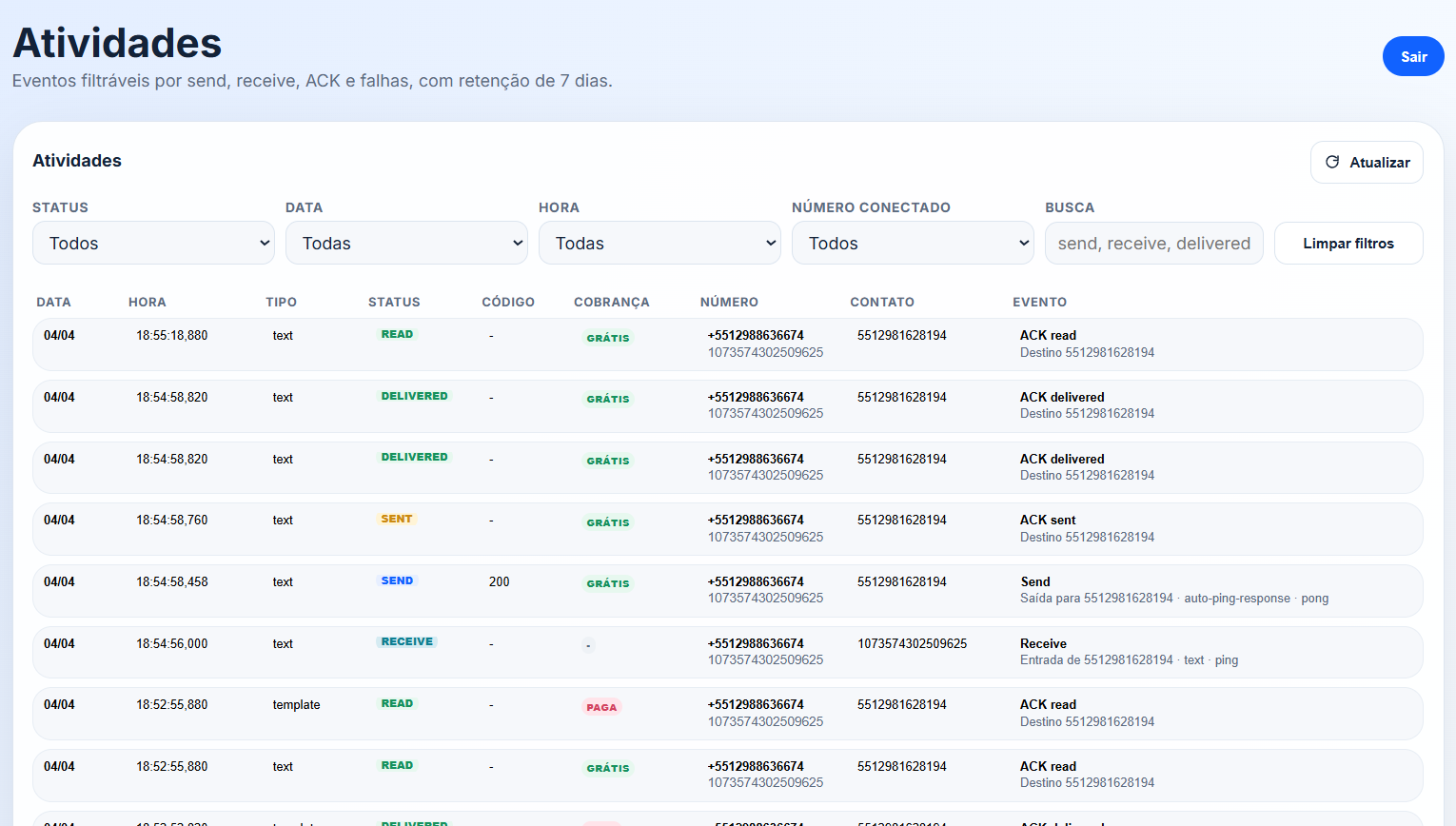
Filterable activities

Filterable activities

Filter events by status, date, time, line, and search so you can find what matters faster.
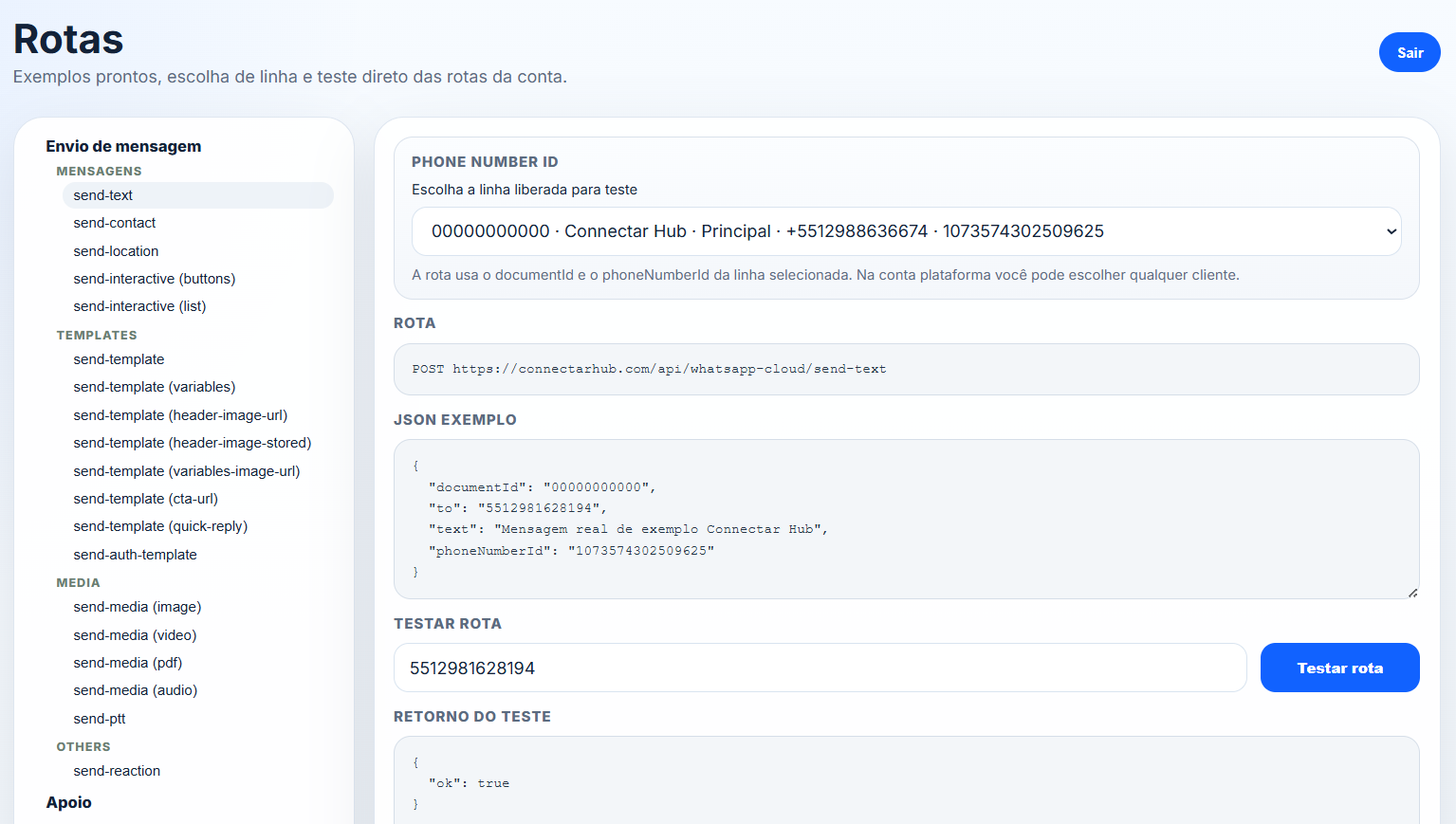
Routes with live testing

Routes with live testing

Choose the line, inspect the sample JSON, and test the route in the dashboard with immediate feedback.
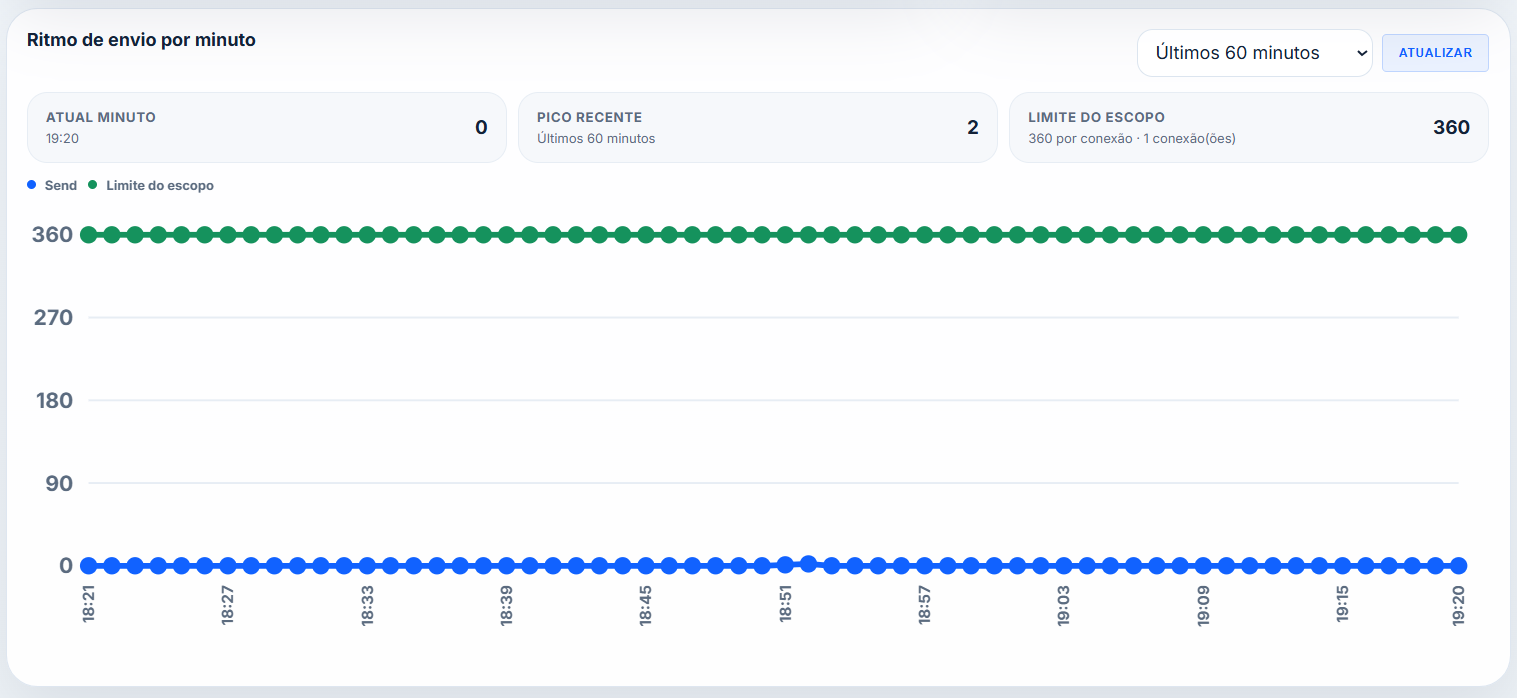
Sending limits

Sending limits

View minute throughput, recent peak, and available sending capacity according to the active plan.
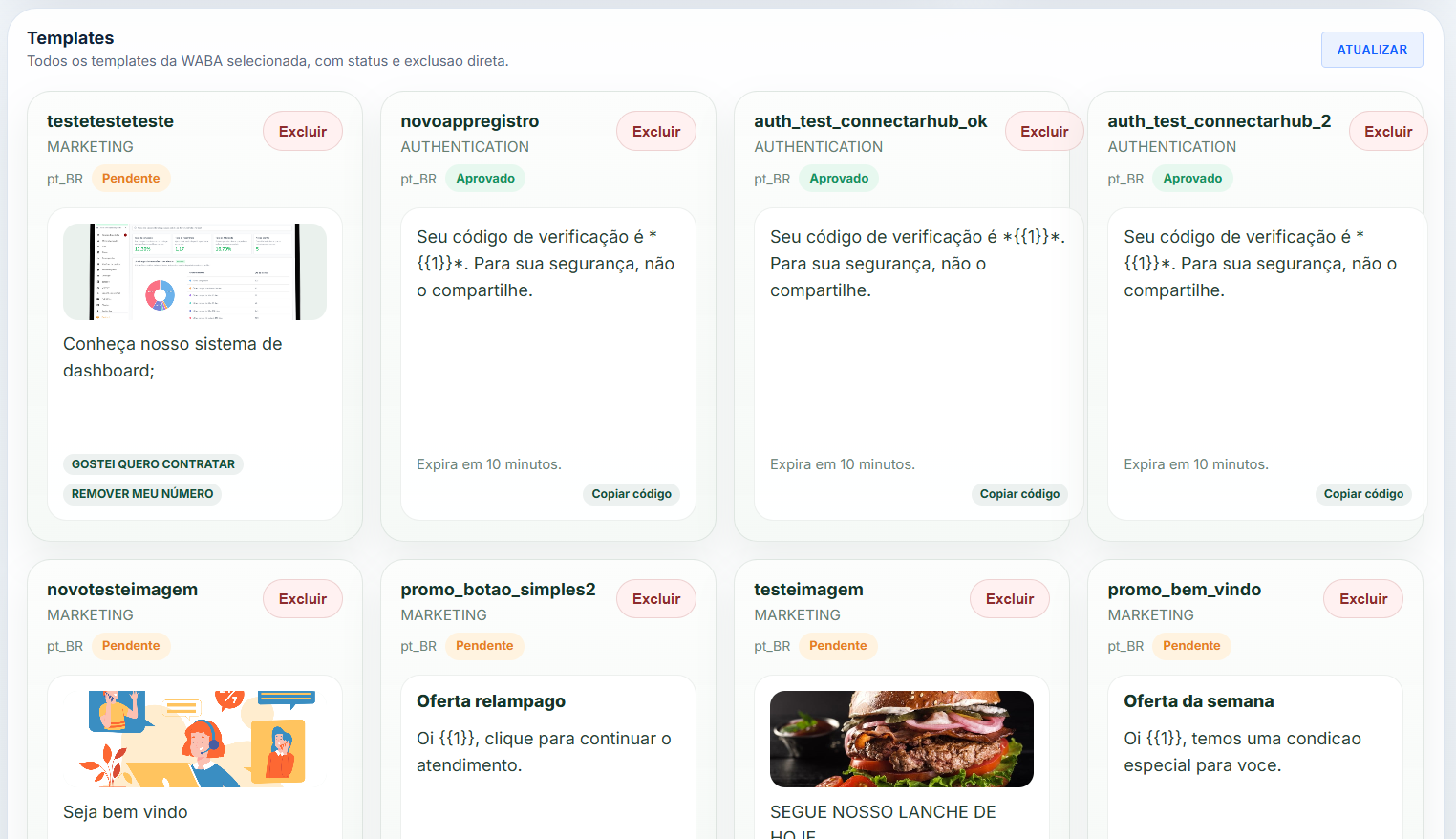
Template management

Template management

List templates, track approval status, and organize utility and authentication messages in one place.

WhatsApp Cloud API

Features available for your WhatsApp number connected via API.

Message sending

Text, images, audio, video, documents, contacts and location — all in a single REST call. Your app talks to customers on the channel they already use every day.

  • Plain and formatted text
  • Images, audio, video and documents
  • Contacts (vCard) and location
  • PTT audio (voice message)

Approved templates

Start conversations anytime with Meta-approved messages. Perfect for notifications, confirmations and campaigns — no need to wait for the customer to message first.

  • Marketing, utility and authentication
  • Components with dynamic parameters
  • Send outside the 24h window
  • Create templates through the platform with ease

Interactive messages

Turn conversations into guided experiences. Your customers choose options, tap buttons and browse lists without ever leaving WhatsApp.

  • Lists with sections and options
  • Quick reply buttons (up to 3)
  • Link button (CTA URL)
  • Location request
  • Authentication message (OTP)

Receiving and status

Every incoming message, read receipt and delivery status hits your server in milliseconds. Nothing gets lost — with guaranteed automatic retry.

  • Real-time webhooks for incoming messages
  • Read receipts (mark as read)
  • Typing indicator
  • Download and proxy for received media
  • Automatic retry on webhook delivery

How it works

Your number connected and running in minutes.

1

Create your account

Sign up and get your API credentials in minutes.

2

Connect your platform

Set up WhatsApp with your access token.

3

Send and receive

Use REST endpoints to send messages and receive webhooks.

Simple and transparent

Pay only for what you connect.

Silver

Plan for operations with a longer file access window.

U$ 15
/month per connected API
  • Everything in Bronze +
  • Send up to 180 messages per minute
  • Screen for sending messages
  • Download available for 30 days
  • Better for routine operations
Gold

Plan for operations with full file history.

U$ 20
/month per connected API
  • Everything in Bronze and Silver +
  • Send up to 360 messages per minute
  • Unlimited download access
  • Ideal for history and audits
  • More operational predictability

Meta costs (WhatsApp conversations) are billed separately.

Payment via PayPal

Built for developers

Simple REST API, fast onboarding and clear documentation to integrate without friction in minuts.

REST + JSON

Direct pattern: send JSON, receive JSON, and integrate in any language without a mandatory SDK.

Reliable webhooks

Automatic retry, clean payloads, and a predictable structure so your backend can process events with less friction.

Start in minutes

Open the dashboard, validate the sandbox, and make your first call without long setup steps.

Ready examples

Documentation with real routes, stable payloads, and ready examples you can copy, adapt, and ship faster.

No extra infra

You do not need queues, clusters, or parallel services on day one to run the operation safely.

Easy to maintain

Predictable names, consistent responses, and a simple integration your team can keep evolving.

Sandbox testing

Test routes, payloads, and operational flow in sandbox before attaching your official number.

Multiple numbers

Manage multiple numbers in the same dashboard and track each line under your contract.

Dashboard access

The dashboard requires login, keeps protected sessions, and records access history.

Webhook and JSON

Configure the URL, track status, and work with stable payloads from request to webhook.

Templates and auth

Create and send utility, marketing, and authentication templates with ready examples.

Operations and audit

Track activity, throughput, deliveries, and technical events in one dashboard.

FAQ

Common questions about sandbox, connections, webhooks, billing, and platform operations.

Can I test before connecting my official number?
Yes. The FREE account runs for 7 days in sandbox, and paid plans can also use sandbox to validate the integration before going live with their own number.
Can the FREE account connect my own number?
No. The FREE account is sandbox-only. To connect an official Meta number and run in production, you need to upgrade to a paid plan.
Can I connect more than one number in the same account?
Yes. The platform is structured for multiple connections inside the same dashboard. The available quantity depends on your account contract.
What do I receive in webhooks?
You receive inbound messages, delivery events, read confirmations, failures, and other operational WhatsApp Cloud events in JSON with a consistent structure.
Can I configure the webhook and review the payload?
Yes. The dashboard lets you configure the webhook URL, monitor connection status, and work with the payload format supported by the platform.
Does the API use JSON in every route?
Yes. The platform standard is JSON request and response, with ready-to-use examples in the documentation to speed up integration and testing.
Is there documentation for sending, templates, and media?
Yes. The dashboard includes documentation with real routes, request and response examples, plus support for text, media, templates, interactive messages, and authentication.
How does dashboard access work?
Dashboard access is login-based. The platform keeps protected sessions and access history to give better operational control over the account.
Can I keep WhatsApp installed on my phone?
Yes. Meta currently offers a feature called Coex, or coexistence, which allows you to keep WhatsApp Business on your phone while also using API capabilities for integration.
How does billing work?
Connectar Hub charges for the platform plan according to your contract. Official Meta WhatsApp conversation costs are billed separately.
Is there any lock-in period?
No. You can cancel at any time. Just access your dashboard and delete your account whenever you want to stop the operation.
Do limits and retention change by plan?
Yes. Plans vary by throughput, file retention, and operational features. You can start smaller and upgrade as your operation grows.